7 Ways to Reduce Missed Calls and Respond to Leads Faster
Every missed call is a lead you already paid for. Here are seven ways to answer more of them, with VoiceAI covering the hours and overflow your team can’t reach.
At 10:50 pm on a Saturday, someone with a broken water main is calling the first three plumbers they find. One picks up. The other two go to voicemail, and the caller hangs up before the beep.
The same thing happens in more subtle ways all day. A caller gives up in the queue during the lunch rush. A web form sits unread until morning. You spent the budget to make that phone ring, so losing the conversation at the very last step makes it all for naught. The good news is that it’s one of the more fixable problems in marketing.
We spend a lot of time on this topic at CTM, and our short version is this: let VoiceAI handle the routine, predictable first-contact work around the clock, so your people have room for conversations that need judgment, empathy, expertise, or a little persuasion.
Speed matters more than most teams assume, too.
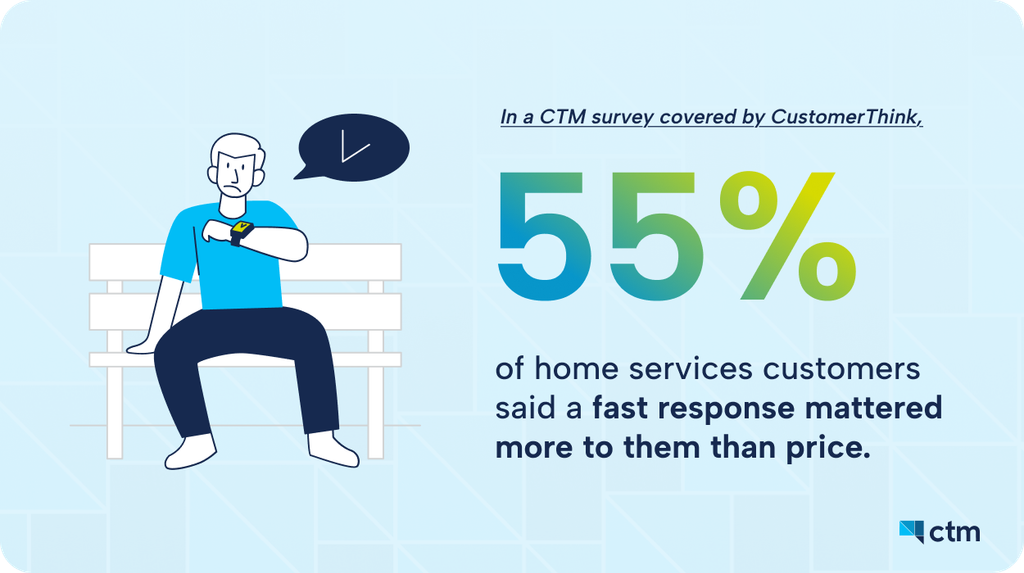
That’s one industry, but we’d bet your buyers aren’t any more patient. Customers like convenience, and it can impact your bottom line.
Quick Q&A: How Do You Reduce Missed Calls and Respond to Leads Faster?
No, really. How are you currently covering missed overflow and after-hours calls and getting the important customer details you need to respond faster to leads?
Answer – Here’s the updated way to get that done: Cover after-hours and overflow calls with VoiceAI, decide when a person takes over, call form leads back right away, route each inquiry to the right team, and automate the follow-up. Then judge the results by what happened to those calls (answers, qualified leads, bookings) and not by how many minutes the AI logged.
The seven steps below walk through how to set up this all up, starting with the gaps that cost you the most. .
1. Let VoiceAI Answer After Hours and During the Rush
Your team can’t be on the phone at 2 am, and they can’t take three calls at once at noon. VoiceAI can do both. It answers inbound calls, gets the caller’s contact details, finds out why they’re calling, handles the routine questions, and either books the next step or routes the call where it needs to go.
Our advice is to start narrow. Hand VoiceAI the gaps you already know about, like nights, weekends, and overflow, before you think about anything bigger. A home services company might have it take down the address and the problem on a late-night call, then send anything urgent straight to whoever’s on call. The routine requests are waiting for the team in the morning with the details already attached. We go deeper on these examples in our always-on VoiceAI blog.
Try this: Look at when last month’s missed calls came in. The busiest gap is VoiceAI’s first assignment.
2. Decide When a Person Takes Over
AI call coverage works best when everyone, the AI included, knows where its job ends. Before you go live, write down three things: which requests VoiceAI can finish on its own, what it should collect in the process, and what triggers a transfer or a flag for your staff. VoiceAI plugs into the routing you already use in CTM, including call queues, IVR menus, and location-based flows, so a handoff goes to the right person.
Then test the calls that worry you. Someone who needs legal advice should reach an attorney. Someone calling a treatment center in urgent need should go straight into your approved escalation process. VoiceAI takes the repetitive intake questions off your team’s plate so they can give calls like these their full attention.
Try this: List the five questions your team answers most often. Those likely belong to VoiceAI. Anything that makes your best rep pause before answering stays with a human.
3. Call Form Leads While They’re Still Thinking About You
Someone who just filled out your form is as interested as they’ll ever be. An hour later, they’ve moved on (sometimes to a competitor). FormReactor closes that gap by triggering an automated callback or a personalized text as soon as a form comes in, with the form responses and campaign details included.
Try this: Keep the script short. Pick three or four qualifying questions, agree on what counts as a qualified lead, and decide when a person steps in.
4. Send Every Call to the Right Team and Location
Leads and customers don’t enjoy explaining their problem twice. Routing rules in CTM handle schedules, queues, and follow-up, and geo-based routing connects each caller with the location that serves them. Build your rules around two things: where the caller is and what they want.
This matters most when you have more than one front door. A franchise can match each inquiry to the right branch before the call is ever transferred. A real estate brokerage can tell a buyer asking about a listing from a seller looking for an agent, and send each one to the right office.
Geo-routing does take some setup, since smart routing is only as good as the rules behind it. The work pays off every time a caller reaches the right person on the first try.
Try this: Call your own number as a customer would from each service area. Then do it again when that team is unavailable, and see where you land.
5. Make the Follow-Up Automatic and Still Personal
Answering the call is half the job. The other half is making sure the next step happens without a hitch. In CTM, you can trigger confirmations and callbacks based on how a conversation ended, so set a rule for each common outcome: an appointment was booked, a qualified lead is waiting on a human response, or a caller couldn’t be reached.
When someone on your team picks the conversation back up, they should already have the caller’s stated need and contact details in front of them. That way, they continue the conversation, and the caller doesn’t have to start over. Conversation intelligence helps here as well, with call analysis and scoring that show your team who to follow up with first.
Try this: Give every outcome an owner and a deadline. It shouldn’t be “Someone will call them back”; That’s how leads go cold, and customers lose trust.
6. Shape the First Conversation Around the Inquiry
You know your callers better than we do, so we won’t tell you how to run intake. What we can show you is how far the same setup stretches. Picture three inquiries arriving at 9 pm:
- A law firm. Someone wants to know whether they have a case. VoiceAI takes down the basics and sets up an intake follow-up, so the firm starts the morning with a potential new case to review. The legal advice stays with the attorneys.
- A behavioral health treatment center. Someone is asking about treatment for themselves or a family member. VoiceAI handles frontline intake using the questions the center has approved, with a direct route to a trained person whenever one is needed. VoiceAI can be configured for HIPAA compliance with a signed Business Associate Agreement (BAA), and your compliance team should review the configuration before it handles protected health information. HIPAA compliance rests with your company, but we have the readiness tools to help your compliance team get this done more seamlessly.
- A real estate brokerage with several offices. One caller wants to see a specific listing in a specific neighborhood, and another is a seller looking for a brokerage for a downtown market. Each one is routed to the right office and team.
7. Success Metric: Outcomes Over Minutes
The number of minutes used tells you VoiceAI was busy. They don’t tell you how effective VoiceAI was. Before you change your coverage, capture a baseline, then compare the same hours, call types, and channels afterward. These are the outcomes we’d watch:
- Share of eligible calls answered
- Voicemail volume
- Contact details captured
- Qualified leads captured
- Appointments booked
- Successful transfers
- Average response time
After that, look for the spots where leads still drop off or need a second contact they shouldn’t have needed. VoiceAI is going to capture more calls your team doesn’t get to, so minutes used can’t be the success metric.
CTM ties each call back to the campaign that drove it, so marketing and operations can look at the same picture and fix response times where it matters most.
Try this: Pick two or three of these outcomes and record them this week. Check them again 30 days after launch.
Those are three very different first conversations running on the same tools. The questions, the handoff point, and the follow-up all come from how your business already works. For time-sensitive service calls, our home services response blog has more examples.
Try this: Write down the three things your team needs to know before they can take a useful next step with a new inquiry. Start VoiceAI with those and before anything else.
Frequently Asked Questions About Lead Response & Call Tracking
1. Can VoiceAI replace a live intake team?
That’s not the job we built it for. VoiceAI works best for repetitive, predictable work like answering common questions and collecting lead details. Pair it with routing and live transfers, and your team steps in whenever a caller needs empathy, professional judgment, or a longer conversation.
The impact is proof: in a case study published by Jim Malcom of Crucial Consultants, a Medicaid treatment provider deployed VoiceAI agents for overflow and overnight calls and recovered 3–4 admissions per week; roughly $200K–$280K in monthly revenue that had previously been lost to unanswered lines. With features and BAAs in place, we provide what you need for HIPAA-readiness, so support doesn’t come at the cost of privacy.
2. Which metrics show that faster lead response is working?
Start with your eligible-call answer rate, voicemail volume, response time, qualified leads captured, bookings, and successful transfers, and compare each one against your pre-launch baseline. A large number of call minutes on its own doesn’t show that more leads got useful help. Think of minutes as the gas you need in the tank to get there. The distance you go is determined by your intake and call flow needs.
3. How should sensitive healthcare calls be handled?
Use intake questions approved by your compliance team, set up a route to trained staff, and decide what information the agent may collect. VoiceAI can be configured for HIPAA compliance with a signed Business Associate Agreement (BAA). Have your compliance team validate the configuration before it handles sensitive information.
Start With One Gap
You don’t have to rebuild your intake process this week. In fact, we’d advise against it.
Pick one gap: after-hours calls, overflow, or the form nobody’s watching. VoiceAI takes the routine first contact, FormReactor starts the outreach as soon as a form comes in, and routing puts the complicated conversations in the right hands. Decide what a good outcome looks like, test the handoff, and expand from there.